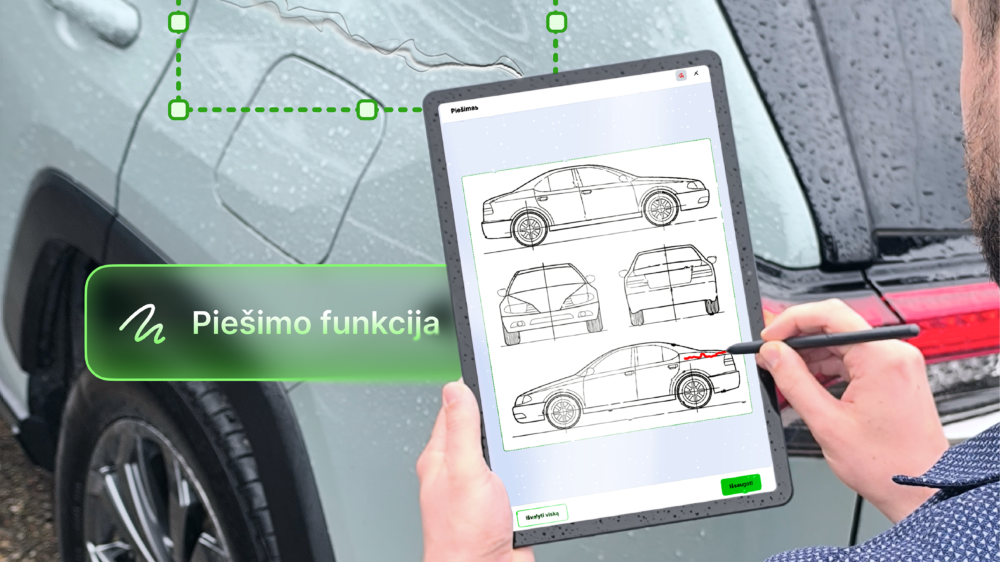
Sometimes entering text, ticking a box or adding a signature is not enough. In some situations, it is important to show an exact location, detail or object. For example, you may need to mark damage on a vehicle, highlight a specific area on a diagram, identify a tooth being treated or point out other visually important information.
To make this possible, the Elpako biometric signature platform now includes a new drawing feature. It allows an image, photo or diagram to be added to a document template so that the customer can mark the required information directly on a tablet before signing the document.
When a document needs more than text
In many customer service processes, a document is more than just something that needs to be signed. Before signing, specific information often needs to be recorded, such as where a defect is located, which part of a service was discussed, which area is relevant to an agreement or what condition an object is in.
Until now, these situations often required additional attachments, handwritten notes, separate photos or verbal explanations. This makes the process more complicated because some of the information remains outside the document or needs to be linked to it manually later.
The drawing feature allows this information to be recorded exactly where it belongs: directly in the document.

How does the drawing feature work?
When creating a document template, the administrator can add a photo, diagram or another image and define an area where the customer will be able to draw or mark the required elements.
When completing the document on a tablet, the customer sees the image and can mark specific areas directly on it. This can be a simple line, circle, arrow or another visual mark. Once the document is completed, the customer signs it on the tablet using a biometric signature.
As a result, the document contains not only written information and a signature, but also clear visual information about the agreement or a specific fact.
Where can it be useful?
The drawing feature is useful whenever a document needs to show not only what the information is, but also the exact object, part, location or area it refers to.
In car rental, repair or insurance processes, scratches, dents and other damage can be marked directly on a photo or diagram of the vehicle. The same approach can be used in warranty service. Instead of describing where a screen is cracked, where the casing is damaged or which part of a product has a problem, the exact location can be marked directly in the document.
In construction and manufacturing, the feature can be used not only to record defects but also to provide more detail about an order. When ordering windows, doors, facade elements, furniture or other custom-made products, it can be used to indicate opening directions, mark the position of openings, show requested changes or even draw a simple sketch of the required solution. When working with building plans or technical drawings, users can also mark the exact location of a defect, planned work or another important area.
The same feature can be useful in agriculture and professional inspections, where a specific part of a field or land plot needs to be marked on a plan or diagram, for example an area of damaged crops. In event planning, the location of a stage, stand, registration area or another agreed zone can be marked directly on the event layout.
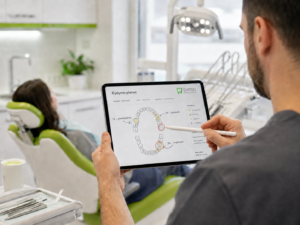
In medicine and healthcare, a specialist can mark the exact area related to a treatment or procedure. For example, a dentist can identify the teeth that require treatment, while a specialist in aesthetic medicine or beauty procedures can mark the areas where a procedure is planned.
Drawing can also be useful in property handover documents. When a home is rented or handed over, specific damage to walls, floors, furniture or other elements can be marked directly in the document, making it easier to record the condition of the property accurately.
All these examples have one thing in common: the document needs to show not only what, but also exactly where. Visual marking reduces the risk of different interpretations and makes it clearer what has been agreed before the document is signed.
A visual agreement before signing
The main value of this feature is not the drawing itself. The value comes from turning visually marked information into part of the document and confirming it when the document is signed.
This allows an organisation to record the discussed situation more precisely, while the customer can clearly see what they are confirming before signing. The document becomes more complete, clearer and more reliable.
In the Elpako biometric signature platform, the drawing feature is integrated into the existing document completion and signing process. The customer can fill in the required fields, mark information on an image and sign the document in one place, directly on the tablet, without paper or additional steps.
Less uncertainty, more accuracy
Digitising documents is not only about removing paper from the process. The real value comes when a digital process helps collect information more accurately, reduces the risk of errors and makes customer service faster.
The drawing feature is a practical addition that supports exactly this goal. It helps organisations not only collect a signature, but also clearly record visual information that matters to a specific decision, service or agreement.
It is another step towards a simpler, clearer and more accurate document signing process at customer service locations.